PROGRAM INFORMATION & APPLICATION PAGE
We recommend you watch this brief 2 minute video and read the FAQ below carefully before you apply for the 3DTraining Program
PROGRAM INFORMATIONAL VIDEO
APPLICATION INVITE
Dear ,
We appreciate your interest in the 3DTraining Work Simulation Program - the fastest way to gain proficiency with .
For more details including projects covered, time required, program fees, support options, internships, and client project assistance, see the FAQ section below.
The next step towards joining the program is to fill out the application below. If approved, you will be provided access to a 7-day trial before you start your training.
PLEASE NOTE:
All applications must be submitted within 7 days of inquiry for consideration.
We look forward to assisting you gain a high level of proficiency to meet your goals and aspirations with as quickly as possible.
Best Wishes,
From the 3D Team
3DTraining.com
P.S: The application process on this page is only for those who are looking to get a break in the 3D industry.
If you are already working in the industry and looking to upskill or seeking corporate group training, please email [email protected]
PROGRAM FAQ
3DTRAINING: What is your company and team background?
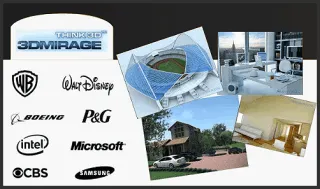
3DTraining, Inc. was initially launched by 3DMIRAGE Studios, New York with support from Autodesk, to close the gap between traditional learning and the skills required in the professional workplace.
3DMIRAGE has worked with several high-profile projects including a Super Bowl commercial for Marquis Jet, modeling the Olympic Stadium for a Samsung promotion, and creating interactive Web3D content for the Matrix and Terminator III websites.
The company's management team and advisory board include former senior executives from Autodesk, Bentley Systems, Adobe, Apple, NYU, UC Berkeley, and CitiGroup.
For more details view the company page on our website 3dtraining.com
PROGRAM: What makes the 3DTraining programs different?
3DMirage Studios like most other companies found that while most training programs provide software familiarity, however, software proficiency is gained on the job through repetition and takes 1-2 years. This is a time-consuming and inefficient process.
In order to overcome this problem, 3DTraining has designed a Work-Simulation program that functions like a flight simulator for learning complex software. Our learning-by-doing methodology reduces the time it takes to gain software proficiency from years to just a few months.
In the Work-Simulation program, participants gain proficiency by working on four in-demand projects assigned with deliverables and deadlines, just like in the real world. The goal of training is to create a professional portfolio by using efficient workflow and improving individual performance to meet client expectations.
The work-simulation program also includes a 6-month online internship program for those who are seeking to get a break in the field. Those who successfully complete the internship program are provided with a work reference letter to better their career prospects.
For more details view the home page on our website 3dtraining.com
PROJECTS: What are the projects covered during the training and internship?
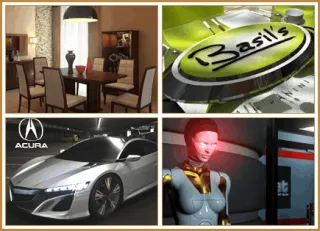
Based on our two decades of training and production experience we have found that it takes an average of four in-demand projects to gain a high level of proficiency with complex 3D software.
The four projects types vary based on the software you are looking to learn and increase with the level of complexity.
Since the goal of the program is for our participants to create a professional portfolio, each participant gets to choose their own specific projects to work on based on their interests.
AUTODESK REVIT PROJECTS: For Architecture & Construction
Interior Design Room
Residential Home
Commercial Building
Urban Planning & Design
AUTODESK 3DS MAX/ MAYA PROJECTS: For Entertainment and Visualization
Interior Design Project
Logo Animation
Product Modeling
Character Animation
AUTODESK INVENTOR PROJECTS: For Engineering & Manufacturing
Robotic Arm
Consumer Product
Commercial Piping
Automotive Engine
AUTODESK FUSION 360 PROJECTS: For Product Design and 3D Printing
Cell Phone Case
Drone Design
Wearables Design
Concept Car Design
INTERNSHIP PROJECTS: Optional for those who apply and get selected
The projects you will work on during the six month internship program will vary, based on your performance in the program and quality of the portfolio projects you create.
After you graduate, based on your performance during the internship phase we may either decide to have you assist with our client projects with our partner studios or work on our internal 3DTraining projects to further your skills.
Besides working on projects, other assignments during the internship may include assisting new students with their projects and other tasks as assigned by the company.
For more details visit the program pages on our website 3DTraining.com
TIME: How is the program conducted and what are the time requirements?
The 3DTraining program is self-paced and the entire program is conducted online using a combination of our Work-Simulator platform and weekly live-online review and helpdesk sessions.
The program is conducted on a part-time basis so that working professionals and full-time students can participate as long as they can dedicate at least 5-10 hours per week for the training program and the optional internship program.
International students residing outside the US can also apply. Please note that is recommended that you should try to attend at least one online project review/lab session per week if possible.
3D TRAINING PROGRAM SCHEDULE: (5-10 hours per week | 4-8 months)
The 3DTraining programs start at the first week of each month with a one-hour online prep session. During this session, you will meet with our instructional team to learn best practices and choose your training projects.
In general if you can spend approx. 10 hours per week on learning and working on your project you should be able to complete each project within one month. So you should be able to complete all 4 projects within 4 months.
However based on your schedule, you can change the deadline to sooner or later depending on the hours that you will be able to dedicate each week.
During the program, if you face any issues at work or personal life you can also pause your program and resume at any time within one year.
LAB-HOURS/REVIEW SESSIONS: The weekly online project review sessions/ labs are usually held every Wednesdays at 8pm and Saturday at 2pm (US Eastern Standard Time).
You need to be able to attend one review session per week of your choice. If the schedule does not work for you, please mention in your application the times you are available on Wednesdays or Saturdays and we will try to accommodate you.
OPTIONAL INTERNSHIP PROGRAM: (10 hours per week | 6 months)
Those who apply and get selected for the optional internship program after graduation will need to be able to commit at least 10 flexible hours per week.
The fixed online meeting times (1-4 hours) each week are generally during week-nights or Weekends so those who are working or studying full-time can also participate.
The rest of the hours are flexible and participants can work on projects assigned based on their convenience.
If you need any further clarifications, please email [email protected]
FEES: What are the program fees and what does it cover?
OPTION 1: TRAINING PROGRAM ONLY
The total fee for the work-simulation program just by itself is $2700.
The program fee includes:
One Year Access to 3D Training Platform
Creation of Four in-demand Portfolio Projects
Project Review Sessions and Live Online Labs
Career Strategy & Post Class Support
Please note: Autodesk currently provides a one year educational software license (value $1600-$2700) to eligible students at no cost.
OPTION 2: TRAINING + INTERNSHIP PROGRAM:
The fee for those who apply for the training with the built-in internship program will be $1350. The remaining balance $1350 will be covered by participating in the internship program.
If you select this option, your fee will include all of the above for the program only option. In addition, after graduation and if selected for the internship you will also be provided additional project work experience, mentorship and guidance to help you take your skills to the next level.
Please note: If you are unsure that you will be able to commit to the internship program while applying we recommend you attend the full-program first and if you later decide to do the internship and if you are accepted, you will be be paid $1350 as stipend at the end of the internship period.
If you choose the discounted training + internship program option and are unable to full-fill the internship requirements you will be liable to pay the balance amount of $1350 towards the program. However, if you complete the program and do not get selected for the internship, you will not be liable to pay the balance amount.
PAYMENT PLANS:
For both the above options 3DTraning provides monthly payment plans of either $300 or $150 per month. Payments can be made by credit or debit cards.
FINANCIAL HARDSHIP PROGRAM:
3DTraining offers a limited about of spots each month for those who are facing financial hardships. Proof of financial hardship and a screening interview may be required to qualify on a case-by-case basis.

POSTCLASS: What are the post class support features offered?
In order to assist our graduates succeed we offer various post-class support options that include:
Career Guidance & Strategy (Personal Roadmap)
Monthly Alumni Meetings (Industry News)
Alumni Networking Opportunities (Project Feedback)
3D Talent Database Listing (Project Referrals)
Client Project Assistance (Discounted Rates)
Please note: 3DTraining does not offer any job guarantees to those who join our training and/or internship program.
However, on a case-by-case basis based on the participants portfolio and performance we do refer our alumni to our partner production studios and AEC firms for project work or apprenticeship program.

SOFTWARE: Which software is the right for me to learn?
At 3DTraining, we focus on providing proficiency with Autodesk software as it is the industry standard when it comes to doing professional work.
You can choose the right software for your learning needs based on the industry that interests you the most.
REVIT: For Architecture, Engineering, & Construction
Revit® BIM software helps architecture, engineering, and construction (AEC) teams create high-quality buildings and infrastructure. more info...
3DS MAX : For Entertainment and Design Visualization
3ds Max® professional 3D modeling, rendering, and animation software enables you to create expansive worlds and premium designs. more info...
MAYA: For Character Animation and Movies
Maya is professional 3D software for creating realistic characters and blockbuster-worthy effects. more info...
AUTODESK INVENTOR PROJECTS: For Mechanical Design & Simulations
Inventor® 3D CAD software provides professional-grade mechanical design, documentation, and product simulation tools. more info...
AUTODESK FUSION 360 PROJECTS: For Product Design and Manufacturing
Fusion 360 is a cloud-based 3D modeling, CAD, CAM, CAE, and PCB software platform for professional product design and manufacturing. more info...
HARDWARE: What are the hardware requirements for learning?
For attending the program, you will need access to a computer which can run the 3d software and internet connection.
We recommend that you use a USB computer headset with a microphone to communicate during the live-online labs.
* Autodesk Revit, 3ds Max, and Inventor run on a windows operating system.
* Maya and Fusion 360 run on both Windows and Mac operating systems.
MINIMUM COMPUTER SPECIFICATIONS: (Source Autodesk)
64-Bit PC with Windows Operating System
Min 8 GB+ Ram & 30 GB+ of free disk space
Dedicated Graphics Card (recommended)
Those who are using a Mac will need to install Bootcamp/Parallels to run a windows operating system to use Revit and 3ds Max.
For more information see the resources section on our website 3dtraining.com

APPLICATION: What is the process for joining the 3DTraining program?
Our work simulation program is for participants who are seriously committed to dedicating the time and efforts to succeed in the industry.
The application process is for us to make sure that our program will be the right fit for you. The steps for joining the 3DTraining programs are provided below:
STEP1: APPLICATION PROCESS
The first step towards joining the program is to fill out the program application anytime within the next 7 days.
It takes around 3-7 working days for our team to review your application and inform you if the 3DTraining program will be the right fit for you.
STEP 2: TRIAL PROGRAM
If your application is approved, you will receive an email with a link to register for a 7-day trial program.
The trial will enable you to experience our work-simulation methodology and make sure you are able to meet the requirements before you start the main program.
STEP 3: START THE PROGRAM
After the 7-day trial if all goes well you will be able to continue with your program and start working on your first project.
Once you graduate from the program by completing all the 4 projects, you will be able to access our alumni support features and apply for the internship program.
Please note: In case we determine that the 3DTraining Work-simulation program may not be the right for you at this time, we may suggest other alternative training programs that might be a better suited for your current learning needs.
NEXT STEPS
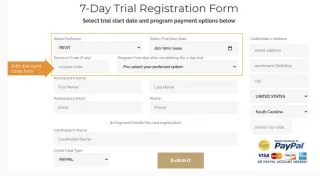
The next step towards joining the program is to fill out the program application anytime within the next 7 days, especially if you are interested in the training + internship option.
It takes around 3-7 working days for our team to review your application. If your application is approved, you will receive an email with a link to register for a 7-day trial program.
The trial will enable you to experience our work-simulation methodology and make sure it is the right fit for you, before you enroll for the main program and get started with your training.
IMPORTANT INFO:
If you do not hear from us within 7 working days of applying, please check your spam folder first and then email us at [email protected] to receive a status update.